
Technical reference · Service alarms
What your Sub-Zero is trying to tell you when it shows a code or alarm
A Sub-Zero alarm is read by your model and serial, not a generic chart. A flashing "Service" indicator, a "Vacuum Condenser" reminder, a door-ajar or high-temp alarm, or a fresh-food-warm symptom each point to a category, not a fixed fix. In Petaluma's Sonoma Mountain heat, photograph the code, leave power on, and Book Online.
Why is my Sub-Zero showing an error code in Petaluma?
Near the Petaluma Marina in 94954, Petaluma Sub-Zero Repair photographs the code, matches it to your model and serial and board revision, then meters the sensor or thermistor before replacing anything, because a generic chart misreads codes. Reach the desk at (628) 209-6820 to schedule.
Quick reference
Sub-Zero error codes & alarms list (Petaluma)
A plain-language list of the Sub-Zero alarms and display behaviors we actually see around Petaluma — from the West Side's historic built-ins to newer columns out toward Penngrove. It is a reasoning aid, not a code dictionary: exact meanings differ by model and serial, so verify the real alert against your rating plate before you act.
| Alarm / display behavior | What it usually points to | What to do |
|---|---|---|
| Flashing or solid "Service" indicator | A stored fault, sensor input or board condition — meaning varies by model family. | Photograph it, leave power on, and verify by model/serial before any reset. |
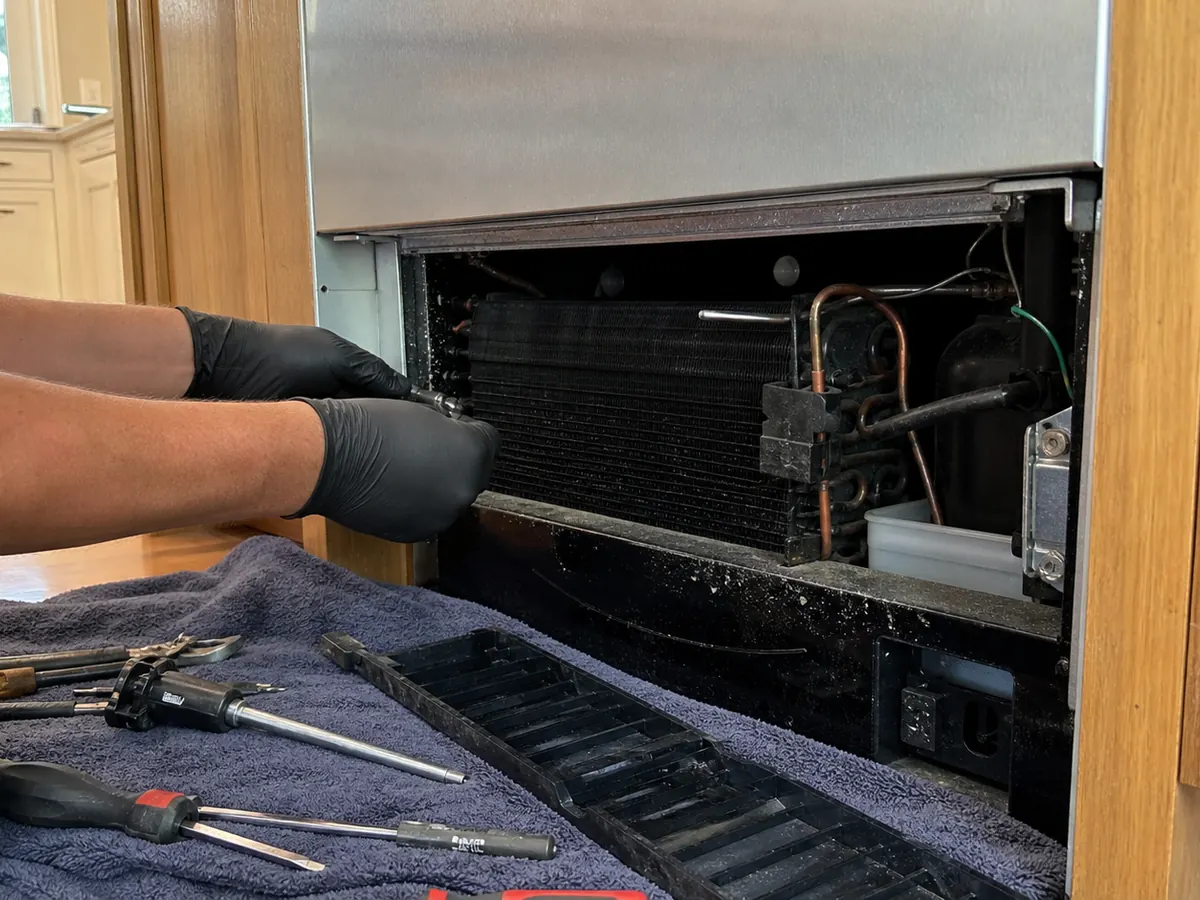
| "Vacuum Condenser" reminder or long, hot run times | Condenser packed with dust, pet hair or Sonoma County wildfire ash choking airflow. | Pull the lower grille, inspect and clean the condenser, then re-probe cycling. |
| High-temp alarm during a Sonoma Mountain heat spell | Summer condenser overload or a marginal condenser fan, not always the electronics. | Note the timing pattern; clean the coil and check the fan, then re-test under similar heat. |
| Frost line or condensation at the door edge | Door gasket leak or seal set — common where Petaluma's marina fog and marine air work the seals. | Paper-drag test on a closed door; OEM gasket or hinge/panel realignment as confirmed. |
| Fresh-food warm while the freezer still holds | Evaporator fan, a frosted coil or an air damper — not necessarily the sealed system. | Watch fan rotation and airflow; defrost, fan or damper repair as measured. |
| Blank, frozen or unresponsive display | Control board, ribbon connector or power supply — read the supply before condemning a board. | Confirm supply voltage and connections; reseat or replace the verified board, avoid repeated power-cycling. |
Newer Sub-Zero models may show an EC-style electronic code; the meaning is model-specific, so read it against your model and serial rather than a generic chart. Hard North Bay water can also foul ice and water lines, which mimics other faults. Call (628) 209-6820 before resetting.
Why a code is not a diagnosis
When a Sub-Zero throws a code, owners in Petaluma understandably want the one-line answer — but the honest answer starts with where the unit lives. Most Sub-Zeros here are built-ins set into custom cabinetry, and reaching the control board or a suspect sensor often means a planned cabinet pull and careful reseat rather than a quick look. That risk shapes the whole job: on a routed day that runs out through Sonoma, we want the code, the timing and a model/serial reference in hand before we arrive, so the visit is a confirmation, not a guessing trip. The code narrows the search; it does not end it.
A second, very common trigger is mechanical, not electronic. A condenser coil packed with dust or pet hair chokes heat rejection, so the compressor runs long and hot and compartment temperatures creep up — which can in turn set a high-temperature or long-run alarm. In plain terms: the coil acts like a clogged radiator, and the alarm is the symptom downstream of it. What confirms it is direct inspection — pulling the grille, photographing the coil, and reading both compartment temperatures against the setpoint. The limitation is honest: we cannot know before opening the unit whether the dirty coil is the whole story or whether a weak condenser fan, a failing thermistor or a board fault is also feeding the same alarm. That is why a chart that says "this code = clean the coil" can point you down the wrong path.
Reading a code safely — what you can do, what needs a technician
You can do real, useful diagnostic work without opening anything or touching refrigerant or wiring. The goal of the homeowner steps below is to capture information, not to repair — and to avoid the one habit that hides faults.
Safe for a homeowner: Record the exact code or light pattern and photograph the display. Note the time it appeared and whether it repeats. Photograph the model-and-serial tag. Read the temperature shown in each compartment. Check the obvious: a door left ajar, a blocked vent, a recently overstuffed shelf, or a grille buried in dust. Make sure the unit is on its own working outlet.
Please do not keep power-cycling. Unplugging to clear an alarm once is fine; doing it repeatedly can mask a real fault and stress the compressor and control board — and it erases the timing pattern that helps diagnose the unit.
Needs a trained technician: Anything involving refrigerant or the sealed system, control-board or wiring tests, thermistor and probe measurement, defrost-heater checks, or removing a built-in from its cabinet. These require meter work, EPA-handled procedures and a planned cabinet pull — not DIY.
The alarm categories we actually see
Rather than invent code numbers, it is more honest — and more useful — to group what alarms generally indicate. Sub-Zero displays and light patterns differ by generation, so treat these as categories to investigate, each confirmed on your specific unit:
- Temperature alarm — a compartment is warmer (or colder) than its threshold for too long. Often downstream of a dirty condenser, weak fan, or a real cooling fault.
- Sensor / thermistor fault — the board reads a temperature value that is out of range or implausible, suggesting a probe or its wiring rather than the cooling system itself.
- Defrost fault — the automatic defrost cycle did not complete as expected, which can let the evaporator ice up and starve airflow.
- Door-ajar alarm — a door or drawer switch reports the unit open past a time limit; sometimes a true open door, sometimes a tired gasket, dropped door or failing switch.
- Control-board fault — the control electronics flag an internal or communication problem. This is the category most often misread from generic charts.
The code tells you which door to open. Which part to replace is decided on the unit, by model and serial — never from a chart alone.
Diagnostic table: from behavior to repair path
Use this to reason about a behavior, not to look up a magic number. Every row still ends with on-unit confirmation by model and serial.
| Alarm / behavior | Likely category | Confirmation test | False-positive to avoid | Repair path |
|---|---|---|---|---|
| Fresh-food warm, freezer fine, long run times | Temperature alarm | Read both compartment temps; pull grille and inspect condenser; check condenser fan | Assuming sealed-system loss when the coil is simply packed with dust or pet hair | Clean condenser, replace fan if weak; re-verify temps before closing |
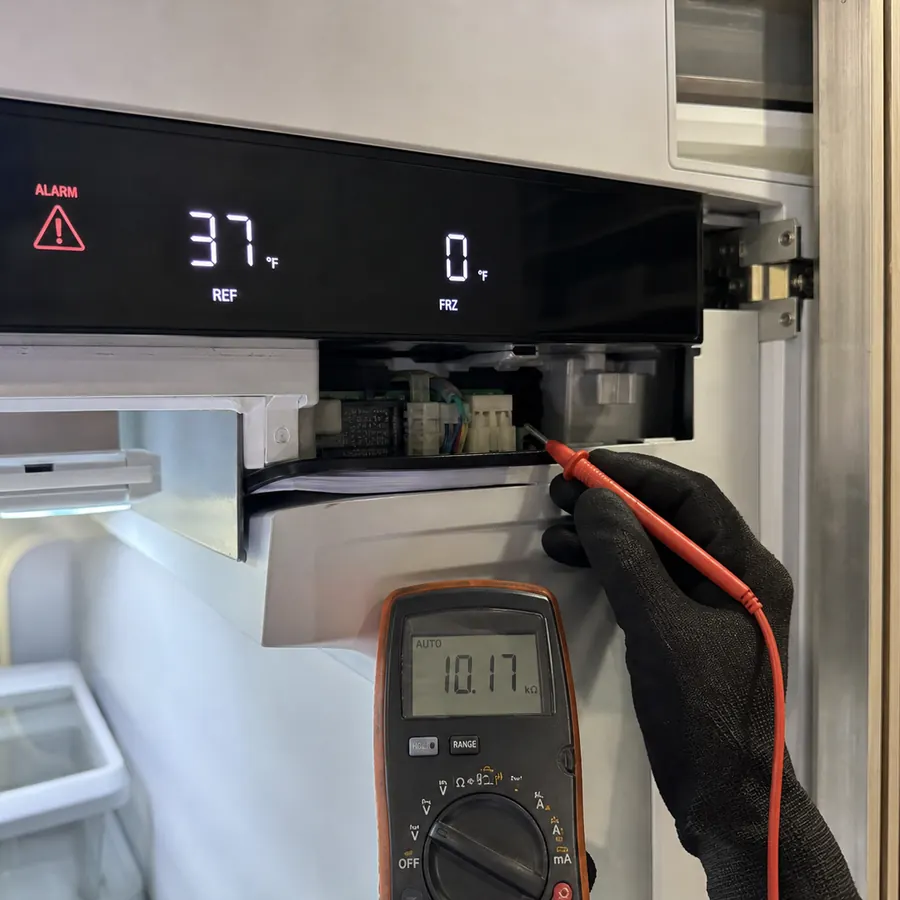
| Plausible but slowly drifting compartment temperature | Sensor / thermistor fault | Measure thermistor resistance against the unit's value; compare to actual temp | Replacing a board when only a probe or its connector is reading wrong | Replace thermistor / repair connector; verify the board now reads true |
| Frost building, airflow weak, periodic warm spells | Defrost fault | Confirm defrost cycle initiates and completes; inspect evaporator and heater | Treating evaporator ice as a refrigerant problem before defrost is checked | Repair defrost heater, sensor or control as confirmed; clear evaporator |
| Door-ajar alert with the door clearly closed | Door-ajar alarm | Test the door / drawer switch; check gasket seal and door alignment on a closed door | Swapping the switch when a tired gasket or dropped door is breaking the seal | Replace switch or gasket, realign door; confirm seal closes the circuit |
| Display blank, frozen, or showing an internal/control alert | Control-board fault | Verify supply voltage and connections before suspecting the board itself | Reading a generic chart's "board failure" before power and wiring are ruled out | Repair wiring/connector or replace correct board revision by serial |
| High-temp alarm only during hot afternoons or after hosting | Temperature alarm (load) | Note timing pattern; inspect condenser load and fan under heat | Blaming the electronics for what is really summer condenser overload | Clean coil, confirm fan, advise on load; re-test under similar conditions |
| Wine column reading a few degrees off setpoint, no hard alarm | Sensor / temperature drift | Compare displayed vs measured temp in each zone; check zone sensor and airflow | Adjusting the setpoint repeatedly instead of finding the drifting sensor or fan | Calibrate/replace zone sensor or fan as confirmed by model and serial |
| Alarm clears on power-cycle, then returns hours later | Intermittent — multiple categories | Log timing across cycles; reproduce under the conditions it appears | Calling it "fixed" because a reset silenced it once | Isolate the intermittent source on the unit before replacing parts |
Notes by Sub-Zero family
How an alert presents — a number, a word, or a blinking light — and which sensors and board revisions sit behind it differ across generations. Treat each note below as a starting point; the values and exact behavior are verify by model/serial.
- 600-series built-in side-by-sides — older controls often signal through light patterns and basic temperature alerts rather than rich text codes. The fresh-food side tends to warn first while the freezer still holds. Exact alert behavior is verify by model/serial.
- Integrated / panel-ready columns — generally newer electronic displays that can show clearer alerts, but board revisions changed across runs, so a code's meaning and the matching part are verify by model/serial. Their tight built-in installs make cabinet pulls part of the diagnosis.
- Over-and-under built-ins — combine fridge and freezer logic, so a single alert can originate in either compartment's sensor or defrost circuit; which zone it refers to is verify by model/serial.
- Undercounter refrigerator & freezer drawers — drawer switches and compact sensors make door-ajar and short-cycle alerts common; switch and gasket part numbers are verify by model/serial.
- Dual-zone wine columns — each zone has its own sensor and airflow, so a "drift" complaint may show as a soft alert or none at all; zone sensor behavior and tolerances are verify by model/serial.
- Classic & designer freezers — defrost and temperature alarms dominate; whether an alert reflects a defrost heater, sensor or control issue is decided on the unit and is verify by model/serial.
Service reality across Petaluma & Novato
Where the unit lives changes how we approach a code, and a route that runs south toward Novato makes that concrete. Many Novato kitchens are newer and more open than Petaluma's historic-district homes, with larger Sub-Zero columns and second-home schedules — owners who arrive for a weekend and find an alarm already logged on a unit that has been quietly drifting for days. That changes the diagnosis: an intermittent code on a lightly used second home has to be reproduced under real conditions, not just cleared, and access often means coordinating with a property manager rather than catching the homeowner at the door. The newer cabinetry tends to be tighter and more integrated, so even a "simple" sensor or board check on these columns can require a planned, protected pull and reseat. Back in central Petaluma — the 94952 core and the West Side — older built-ins in tight period surrounds mean the same alarm can be a half-hour confirmation or a careful two-person cabinet job depending on how the unit sits. We plan the visit around that reality so the code we read is the code we fix.
The evidence behind every call
An alarm earns its repair only when the evidence agrees with it. Take a door gasket leak, condensation, or a frost line that has tripped a door-ajar or high-temperature alert: the code alone could point to a switch, a board, or refrigerant. So we gather proof instead. Temperature readings in both compartments show how far and how fast cold is being lost; condenser and evaporator photos document coil condition and frost pattern; serial-specific evidence ties the alert to the correct sensor table and board revision; and OEM fan, gasket and control-board evidence rules out the cheap culprits before anyone names an expensive one. With a gasket, we test the seal on a closed door rather than eyeballing it — a door that has dropped on its hinge or a gasket that has taken a set will read as "open" to the switch even when it looks shut. That evidence trail is also why this page reads like a manual: it is the same record we hand you in writing, so a part swap is justified, not guessed.
For an alert that points at the sealed system or compressor, the same discipline applies in more depth — read the sealed-system & compressor guide for how refrigerant faults are verified to EPA standards, or start from the broader Sub-Zero repair overview if you are not sure which category your unit is in.
Common symptoms behind these alarms
An alarm is rarely the whole story — it usually rides on a physical symptom you can describe. If you can name what the unit is actually doing, start from the matching symptom page; each one explains how that fault is confirmed on the unit before any part is named.
- Not cooling — a high-temp alarm with the fresh-food side drifting warm while the freezer holds.
- Sub-Zero freezer not freezing — the freezer warming while the fridge stays cold, often a defrost or fan fault behind the alert.
- Sub-Zero leaking water — water on the floor that can trip a high-temp or door-ajar alarm when a defrost drain or gasket is involved.
- Sub-Zero making noise — a buzz, knock or repeated click that can accompany a fan, compressor or ice-maker alert.
Petaluma citation facts
Alarm and code facts for Petaluma Sub-Zero diagnosis
- Petaluma context
- Error codes are model-and-serial clues, not final diagnoses; Petaluma calls should pair the code with temperature readings, filter age, recent heat, water-line symptoms and cabinet access.
- Most quotable range
- Alarm diagnostics usually start at $139-$169; code-driven sensor, board, fan or ice/water repairs typically run $368-$782 after the exact fault is confirmed.
- Measurement threshold
- Record the displayed code, alarm time, compartment temperature in °F, and whether power-cycling makes the alarm return within 24 hours.
- ZIP / access cue
- An alarm after a Sonoma Mountain heat spell points to airflow checks; an alarm in a historic built-in may require cabinet-safe access to inspect boards or wiring.
| Service / symptom | What is included | Price range | Timing |
|---|---|---|---|
| Code/alarm diagnostic | Code photo, model/serial, temperatures, reset history, stored fault review | $139-$169 | 60-90 min |
| Sensor, thermistor or fan branch | Meter check, fan command, serial-specific part match | $368-$642 | Same visit or ordered part |
| Control-board branch | Board output verification, wiring check, OEM revision match | $542-$882 | Ordered part likely |
| Alarm tied to sealed-system symptom | Airflow and defrost false positives cleared before sealed-system test | $1,180-$2,490 | Scheduled repair |
Final price depends on model and serial, cabinet access, temperature evidence, OEM part availability and whether the diagnostic fee is credited to an approved same-unit repair.
Diagnostic steps for this Petaluma page
- Photograph the alarm Capture the exact code, light pattern or display before clearing it.
- Record temperatures Write down fresh-food, freezer or wine-zone readings in °F.
- Avoid repeated resets One reset may help; repeated power-cycling can hide the fault pattern.
- Match model and serial Code meaning can shift by board revision and production range.
- Test the component Confirm sensor, fan, board, defrost or sealed-system evidence before ordering parts.
Reading codes safely — questions
Can I look up my Sub-Zero error code online and know the exact fix?
Not reliably. A code points to a category of fault, but the exact meaning depends on your model and serial and the control-board revision inside the unit. Two units showing a similar alert can need different repairs. Record what you see and have it verified by model and serial rather than trusting a generic chart.
Is it safe to keep unplugging the Sub-Zero to clear an alarm?
Power-cycling once can clear a transient alert, but repeatedly cutting and restoring power can mask the real fault and stress the compressor and control board. If the alarm returns, stop, leave it powered, write down the code and timing, and book a technician.
What information should I record before calling about an alarm?
Photograph the model and serial tag, note the exact code or light pattern, the compartment affected, the temperature shown, and when the alarm started or repeats. That record, plus a model/serial reference, lets us bring the right parts and verify the fault by model and serial.
The alarm went away on its own — do I still need a visit?
Often yes. An alert that clears and returns is usually intermittent, and an intermittent fault needs to be reproduced and isolated on the unit, not assumed fixed because it went quiet. Log when it appears so we can reproduce it under the same conditions.
How much is a Sub-Zero diagnostic visit in Petaluma?
Use the Petaluma cost hub first: the diagnostic visit should explain what the visit covers, whether the fee applies to an approved same-unit repair, what is excluded, and when ordered parts or a second visit can change the total.
Why does a historic-home built-in cost more to service?
Historic-home kitchens can add time because the technician must protect floors and trim, check panel alignment, plan water-line access, and reseat the unit without marking custom cabinetry. That access work is real labor, not a hidden surcharge.
Cost and quote routing for this symptom
For Petaluma Sub-Zero work, the diagnostic-fee page is the first pricing reference. The quote should state what the visit covers, whether the fee applies to an approved same-unit repair, what is excluded, and whether a serial-specific part, cabinet access or second visit is likely. Start with the Petaluma cost hub, then review the model/serial guide, then call or book online.
Book service by phone or online
Call or book online to choose a diagnostic window. The technician confirms the code, model details, and final repair scope on site.
Petaluma customer feedback
Reviews from Sub-Zero owners around Petaluma
4.9318 verified repairs
Our 650 threw an alarm after a brutally hot afternoon and I snapped a photo of the code and the temperatures before doing anything. That let the technician skip straight to the fan and thermistor tests instead of fishing around. A sensor was reading wrong, he replaced it, and the alarm cleared for good.
We'd gotten in the habit of unplugging it whenever the alarm came on, but it always returned by morning. He explained that power-cycling was erasing the very clue he needed, then read the board output and replaced the correct fan for our serial. It's held a steady 37°F ever since.
I assumed the alarm meant a failed control board and an expensive order. Instead he traced it to a leaking door seal letting warm air in, gauge-tested the gasket, and corrected the panel reveal. No new board needed. I appreciated that he chased the actual cause before ordering parts.